
Understand Pitch Limits, Required Rest, and Availability
Understand how recorded pitch counts and rest rules determine the availability Inningly shows for each pitcher.
Last reviewed
Inningly uses your team’s selected Rest Schedule and recorded pitcher workloads to calculate required rest and a player’s next available date.
The built-in baseball schedules are based on the MLB and USA Baseball Pitch Smart guidelines. For more background, read All About the Pitch Smart Player Safety Initiative.
Caution
Inningly provides planning guidance—it does not enforce every Pitch Smart recommendation or your league’s pitching rules. Coaches remain responsible for confirming the rules that apply to their team, recording complete workloads, and responding to fatigue, soreness, or pain.
Assign your team’s rest schedule#
A rest schedule must be assigned before Inningly can calculate pitcher availability.
- Open Team Settings.
- Find Rest Schedule (optional).
- Select the schedule that applies to your players.
- Click Save Changes.
Although the field is optional when saving your team settings, leaving — No rest schedule — selected prevents availability calculations from running.
Your team’s Age Group and Sport do not automatically select a rest schedule. Review the available schedules and make the appropriate selection yourself.
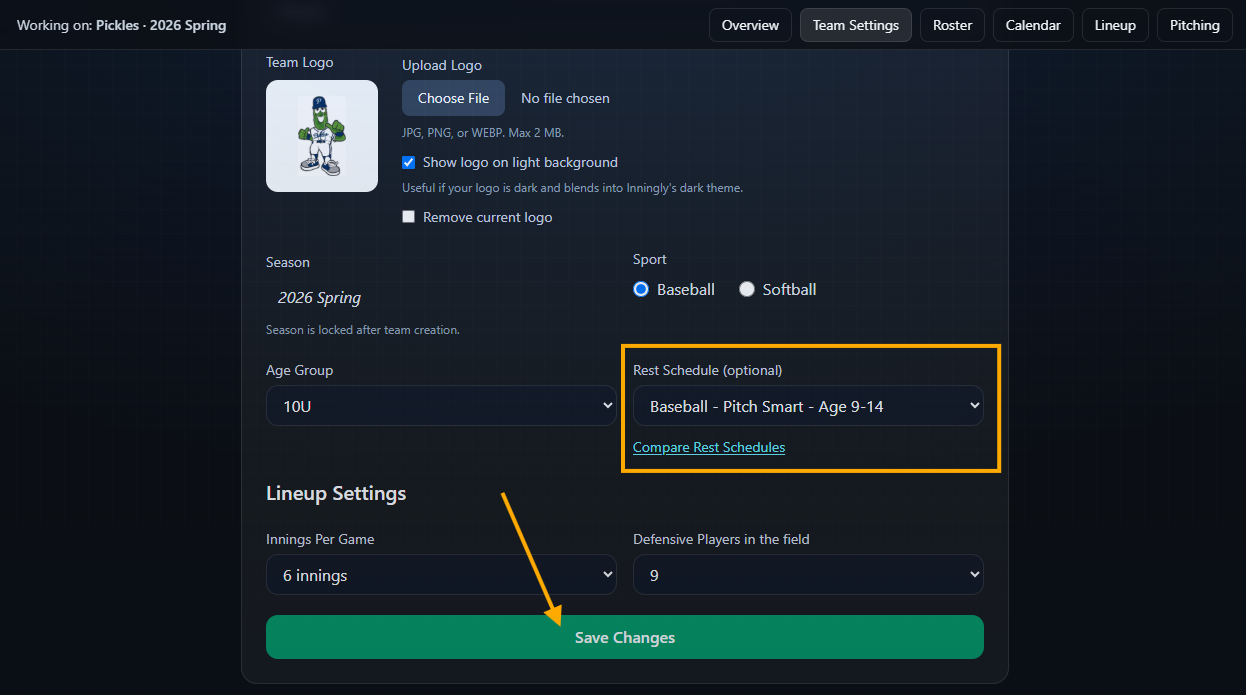
Only the team owner or a Head Coach can change the rest schedule. Settings for an expired season can be viewed but not changed.
Understand the built-in rest schedules#
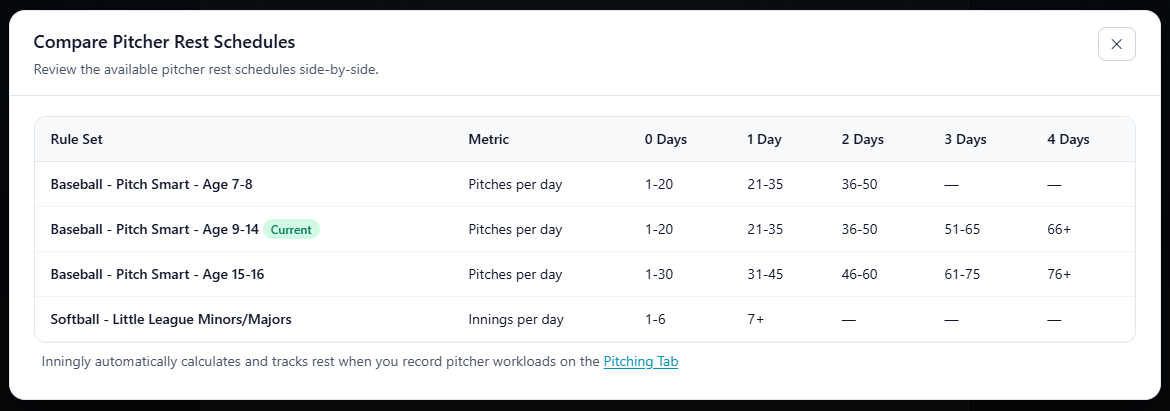
Inningly currently provides these built-in schedules:
| Rest schedule | Measurement | 0 days | 1 day | 2 days | 3 days | 4 days |
|---|---|---|---|---|---|---|
| Baseball – Pitch Smart – Age 7-8 | Pitches per day | 1–20 | 21–35 | 36–50 | — | — |
| Baseball – Pitch Smart – Age 9-14 | Pitches per day | 1–20 | 21–35 | 36–50 | 51–65 | 66+ |
| Baseball – Pitch Smart – Age 15-16 | Pitches per day | 1–30 | 31–45 | 46–60 | 61–75 | 76+ |
| Softball – Little League Minors/Majors | Innings per day | 1–6 | 7+ | — | — | — |
Select Compare Rest Schedules in Team Settings to review the same thresholds inside Inningly. The schedule marked Current is assigned to your team.
The 9-14 schedule can use one set of rest thresholds because Pitch Smart assigns the same rest bands across those ages. However, Pitch Smart’s recommended daily maximum changes within that range:
| Player age | Pitch Smart daily maximum |
|---|---|
| 7–8 | 50 pitches |
| 9–10 | 75 pitches |
| 11–12 | 85 pitches |
| 13–14 | 95 pitches |
| 15–16 | 95 pitches |
| 17–18 | 105 pitches |
Inningly uses the selected schedule to calculate rest. It does not stop you from entering or planning a workload above the applicable daily maximum.
The Age 7-8 schedule is defined only through its 50-pitch daily maximum. If a workload above 50 pitches is recorded under that schedule, do not rely on the resulting availability calculation. Inningly also does not currently provide a separate built-in schedule for ages 17-18. Coaches of older teams should follow their governing organization’s limits and rest rules rather than treating the Age 15-16 schedule as authoritative.
How required rest becomes an available date#
Inningly calculates availability in calendar days:
- Workloads recorded for the same player on the same date are added together.
- The daily total is matched to the selected rest schedule.
- Inningly adds the required full rest days.
- The player becomes available on the following calendar date.
For example, under the Baseball – Pitch Smart – Age 9-14 schedule:
- 15 pitches on Friday requires 0 rest days. The player is available Saturday.
- 40 pitches on Friday requires 2 rest days. The player rests Saturday and Sunday and becomes available Monday.
- 20 game pitches and 16 bullpen pitches on Friday total 36 pitches. The combined workload requires 2 rest days.
A workload recorded on the date being reviewed counts toward that date. Even when the workload falls in a 0-rest-days band, the player’s next available date is the following calendar day.
When several recent outings exist, Inningly uses whichever one produces the latest available date. Workloads more than 60 days before the date being reviewed are not included in the calculation.
What Inningly does not calculate#
Pitch Smart and individual leagues may include safety rules beyond the rest thresholds shown in Inningly. The availability calculation does not currently enforce:
- Daily pitch-count maximums
- Restrictions on pitching in multiple games on the same day
- The Pitch Smart restriction against pitching on three consecutive days
- Weekly, seasonal, or annual workload limits
- Combined pitching and catching workload rules
- Return-to-the-mound restrictions
- Work performed for another team unless you record it for this team
- Fatigue, soreness, pain, mechanics, or medical concerns
A player shown as Available has satisfied the selected schedule’s recorded rest calculation. It does not necessarily mean the player is eligible under every applicable rule or physically ready to pitch.
How team settings and records affect the result#
One rest schedule applies to every player on the team. If you change it, Inningly immediately recalculates availability from the existing workload records using the newly selected thresholds. Past workloads are not changed or deleted.
Changing the team’s Age Group or Sport does not change its rest schedule. If your team moves into a different age group or begins a new season, review the selected schedule in Team Settings.
Availability is only as accurate as the workload history. Record game appearances, practices, bullpens, lessons, and relevant work performed for other teams when that activity should affect the player’s recovery.
See Record pitcher workload for entering those records. If an entry is wrong or duplicated, remove and re-add the workload.
Once your settings and records are complete, review pitcher availability for today or an upcoming game.
Caution
Inningly informs a coach’s decision; it does not replace league rules, communication with families, or attention to how a player feels. When league requirements are more restrictive than the selected schedule, follow the league requirements.
Related articles
- Record Pitcher Workload Record a pitcher’s workload after an appearance so Inningly can calculate rest and future availability.
- Edit or Remove Pitcher Workload Correct an inaccurate pitching appearance or remove a pitch record that should not affect availability.
- Review Pitcher Availability Check which pitchers are available for a specific game and review the workload affecting each player.