
How to Paste a GameChanger Roster into Inningly#
Setting up a new team roster is usually the most tedious part of getting started.
Typing every player manually takes time — especially when you already have your roster set up in GameChanger.
Inningly includes a simple feature that lets you copy your roster directly from GameChanger and paste it into Inningly in seconds.
Instead of typing every player one by one, you can import your entire roster with a quick copy and paste.
Watch the Quick Demo#
Quick video demonstrating how to move an existing GameChanger roster into Inningly#
Step 1 — Open the Roster Page in Inningly#
Start by navigating to the Roster tab for your team.
If you’re creating a new team, your roster will likely be empty.
Instead of adding players manually, click the “Paste from GameChanger” button.
This opens a window where you can paste roster text.
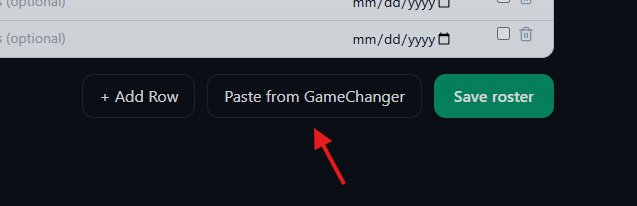 Paste from GameChanger
Step 2 — Copy Your Roster from GameChanger#
Next, open your team in GameChanger.
- Go to the Team tab
- Locate the player list
- Highlight the roster text
- Copy it to your clipboard
It does not need to be perfectly formatted. Just highlight the player list and copy.
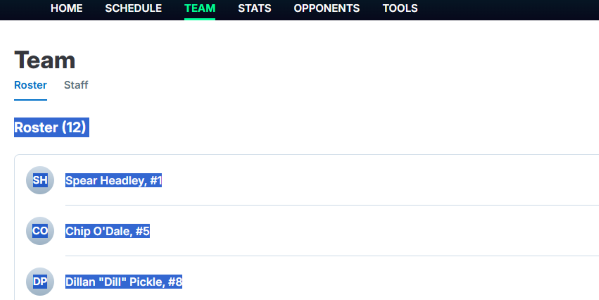 Select and Copy GameChanger Roster
Step 3 — Paste into Inningly#
Return to the Paste from GameChanger window in Inningly.
Paste the roster text directly into the box.
As soon as the text is pasted, Inningly automatically processes the roster.
It will:
- detect player names
- extract jersey numbers
- check for players already on your roster
- remove duplicates if needed
This allows the roster to be cleaned up automatically before importing.
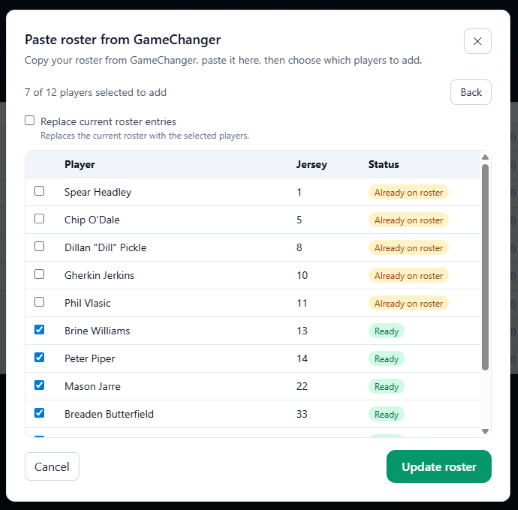 Paste GameChanger Roster into Inningly
Step 4 — Update Your Roster#
Once the players look correct, click Update Roster.
Inningly will generate the roster for your team automatically.
Click Save when you’re finished.
Your roster is now ready to use.
You’re Ready to Start Building Lineups#
Once your roster is saved, you can immediately begin using the:
- Team Calendar: to plan upcoming games
- Lineup Builder: to managing playing time and build game-ready lineups
- Pitcher Workloads: to track pitches or innings thrown and see immediate rest schedules
All without manually entering your players.
Why This Feature Helps#
Many coaches already manage their teams in GameChanger.
This feature lets you set up your Inningly roster in about 10 seconds, instead of typing every player manually.
It’s one of the fastest ways to get started.
If you haven’t created your team yet, you can start here.